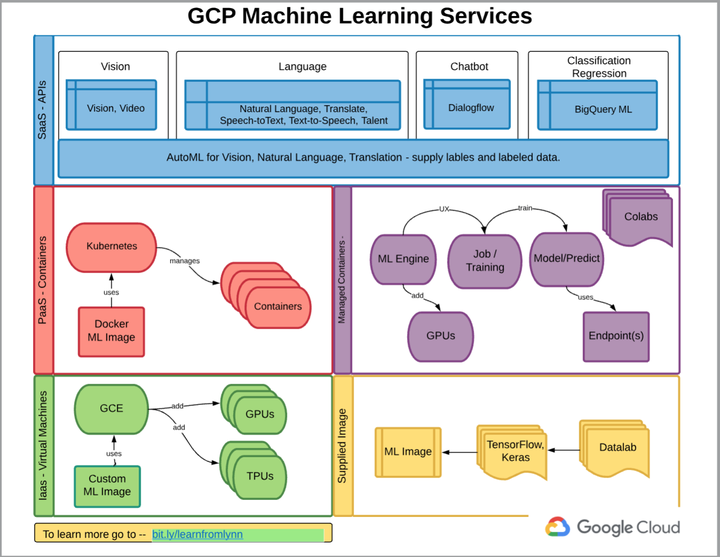
Machine Learning is becoming a common tool to solve problems which we cannot solve easily due to complex nature of data relationships. As its demand increased, cloud service providers took the task of making its use for larger pool of professionals. Setting up development and production environments for machine learning projects used to be very time consuming and was basic bottleneck for researchers. On top that maintaining and ingesting big data for machine learning jobs required dedicated resources (developers, engineers).
By advancements of ML services in cloud, now researchers or small enterprises can get up running models quickly. Also, using cloud services, scalability is not a problem anymore. There are various providers of ML services in the cloud e.g Amazon, Microsoft Azure, IBM Watson, Google Cloud Platform.
Google is contributing towards the large scale use of ML.
The popularity of cloud services is exponentially increased over recent times mainly due to ease of use with scalability. Among various providers of cloud services, Google is trying very hard to make its services available for machine learning tasks. These notes are based on course Google Cloud Platform Essential Training.
Being a Machine Learning researcher, I am going to collect ML Services offered by GCP based on the course listed above.
Basic Overview
Some key points
- Both GUI and API based approach-developers first approach
- Sign up with Google cloud using your gmail account. Get free credit of 300 usd when adding billing details through credit card.
- For any service to use, create a project ()Project name, Project ID) on google cloud.
- Set the Alerts on Usage
- Data Store (various options, buckets, SQL and NoSQL, Bigquery, Datatable), set the zone properly
- Compute Engine (spin VM, K8s instances)
- Cloud Functions (serverless on demand functions, python is supported)
- Creating data bse instances are slow, be patients
- Big Data API’s
- Run the commands in shell, gsutil, gcloud and other api
- A good starting point to learn is run the tutorials
Machine Learning Services
In this section, we collect the key points about using GCP ML services. I will briefly explain my favourite later on.
Under the artificial Intelligence, most commonly or interesting services are
Data Labeling
For supervised machine learning, the input data whether it is text, image, tabular or audio, we need properly labelled data. This service is useful to label data at scale and store in buckets or Big Query.
- Enable API
- Pipeline to label the data ans store (buckets, Sql or NoSql DB for training Ml Models)
AI Platform
Recently added feature of AI Platform collects the data, models and resources at one place. It is useful service for both general use and advanced use.
- Pipelines to label data
- Collect the relevant assets under AI Hub
- Spin off Jupyter Notebook using GCP VM
- Spin off VMs with machine Learning Image (Pre-installed ML Resources, e.g Tensorflow, sklearn etc)
- Notebooks can be run using Google Colab (Public Google Cloud resources)
- Build complete pipeline stat-to finish
- Train available models or build custom training models
- Deploy the trained model to serve for production
Tables
It is also recently added feature of running AutoML with tabular data. This service is useful for someone has knowledge of data and business logic. GCO tables will do the heavy lifting of building the model using AutoML and will provide with the best model under given target and performance measures under the hood.
- Load the data (csv, big query , buckets )
- Select the target variable or features
- Select the Model parameters, Performance measure etc
- Auto ML will return the best Model and feature diagnostic plots
- Deploy the model for production
Vision
Currently, there are three services offered in vision. Image classification using AutoML, Object detection using AutoML and Vision API.
- Train the models to classify images using AutoML
- Deploy the models
Kubeflow
Kubeflow is the machine learning toolkit for deploying ML models using K8s. It is highly scalable and fast to spin off.
Other services include Natural Language , Translation (transformers), video intelligence and Recommendations AI.
Most of the work is done under the hood, to work on low level spin off VM with desired environment and build models.
VM with PyCharm
with professional edition of PyCharm, we can integrate the VM environment with pycharm.
Closing Remarks
This was brief collection of notes from the overview course about GCP. Below are the key points
- ML with GCP is helpful in setting up development environment pretty quickly.
- Start with Google Colab for running ML notebooks
- Having access to business logic and data, it is pretty fast to build and deploy models on cloud with minimal technical efforts
- GCP platform is serving well researchers, developers and practitioners
- Practice more to hands on experience